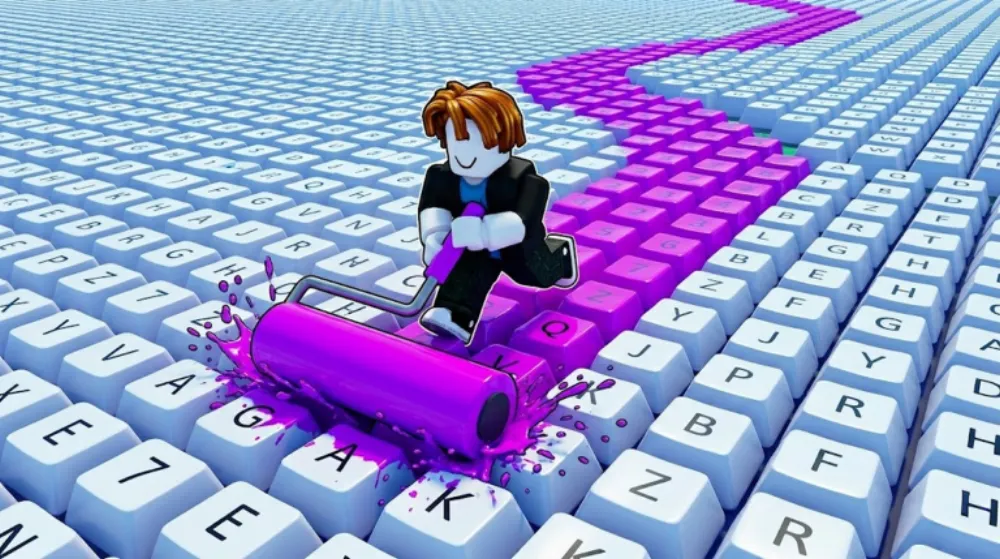
Paint My Keyboard Roblox is the incremental-painter title from sooo satisfying! that has cleared 5.9 million visits in less than a month since its 28 May 2026 launch, sits at 84,000 favorites, and runs a remarkable 14,600 concurrent players at peak, numbers that put it in the upper tier of Roblox launch performance for 2026. The pitch is straightforward: roll paint across keyboard keys, bank the cash, unlock prettier colours, upgrade your roller, and grow your keyboard outward until it covers the whole floor. This paint my keyboard Roblox guide walks through the actual upgrade priorities the game rewards, what each paint rarity tier is worth, how the keyboard expansion mechanic works in practice, and what to know about the game’s progression curve. For another high-engagement casual Roblox sim launched the same window, see the Adopt Me tier list for the cross-genre comparison.
What is Paint My Keyboard on Roblox?
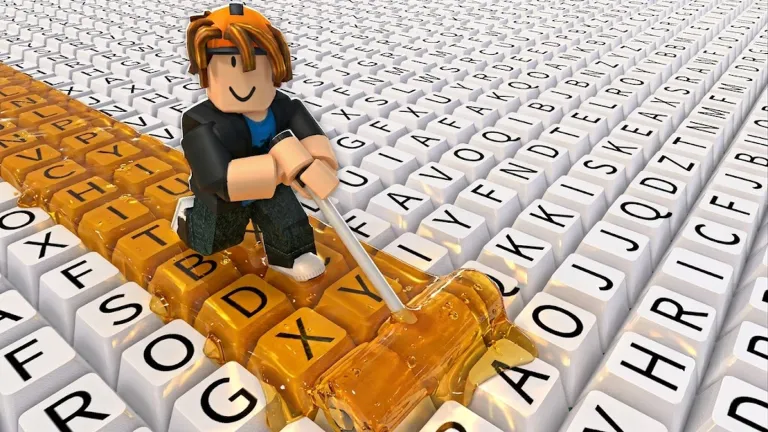
Paint My Keyboard is an incremental simulator in the Roblox catalog’s Simulation > Incremental Simulator family, a category that includes long-tail successes like the painted-tile and farm-grind sims that defined Roblox’s 2024-25 casual wave. The core loop here is satisfying in a deliberately small way: you start with a tiny keyboard layout in front of you, you hold the paint roller, and you roll across keys to paint them. Each fully painted key drops cash. Cash buys you better paints and roller upgrades. Better paints and upgrades let you paint faster and unlock larger keys, which drop more cash. You expand outward.
The Roblox catalog tag is Simulation with an Incremental Simulator sub-tag. The game is one of the better-tuned recent entries in the category, the early-game grind is short enough that new players reach the first satisfying expansion in roughly five minutes, but the mid-game branching pulls players back day after day, which is what the 14,600 concurrent player count tells you.
Quick stats (as of 25 June 2026):
- Visits: 5,928,000+
- Concurrent players: ~14,600 (peak)
- Favourites: 84,000+
- Created: 28 May 2026
- Developer: sooo satisfying! (group)
- Max server size: 8 players
- Genre: Simulation. Incremental Simulator
- Pricing: Free to play (Robux gamepasses available)
For another newer casual Roblox release with the same demographic, see our Catalog Mystery guide, different format (murder mystery survival), same player base. The Catalog Mystery codes page tracks three live cosmetic-unlock codes for that game, and the Catalog Mystery game hub collects guides and stats for all three modes (Standard, Disguises, Assassin) in one place. For an MM2-style entry from the original Cyrus’s MM2 creator group, the Cyrus Infinite guide covers the 5.2M-visit Roblox survival round on tight 12-player servers.
How to play Paint My Keyboard
You spawn with a tiny starter keyboard, a single row of basic keys laid flat on the ground, and a default low-tier paint roller. Walk over to a key and the roller automatically begins painting. Hold position; once the key is fully painted, it drops cash you collect by walking over it. That cash sits in your wallet and rolls into the upgrade panel.
The early-game loop is intentionally fast. Paint a starter key in under a second, bank a few cash, upgrade the roller speed once, repeat. Within the first two or three minutes you should be upgrading from default paint to the next tier and watching the keys drop noticeably more cash per fill. The interface is friendly to new players, no maths to do, no rarity rolls to manage, no PvP, no risk-of-loss.
You progress in two directions simultaneously. Upgrading the roller makes you paint faster and unlocks higher-value paint colours. Expanding the keyboard unlocks more keys (and larger key types, function keys, modifier blocks) which drop more cash per paint job. Most players who quit early are over-investing in one direction; the game rewards staying balanced.
Roller upgrades, the upgrade order that actually matters
The shop panel lists three rough categories of roller upgrades, and the game does not tell you which to prioritise. Based on the in-game economy as it stands in late June 2026, the priority that compounds fastest is:
- Roller speed (priority 1). Faster painting means more cash per minute means more upgrades. This is the single most cost-efficient upgrade for the first 20 minutes of play.
- Paint quality / rarity (priority 2). Higher-tier paints drop more cash per painted key. Buy the next tier of paint once your speed is comfortable.
- Roller width (priority 3). Wider rollers paint multiple keys at once. Worth the upgrade once you have a larger keyboard layout, useless on a starter keyboard with only single-width keys.
Avoid sinking cash into roller width before you have expanded to multi-row layouts; it is overcapacity you cannot use. Conversely, do not stay on the starter paint colour too long, even the second-tier paint unlock pays back its cost inside a minute of normal play.
Paint rarity tiers, what each colour is worth
Paint colours are gated behind unlock costs. Each tier produces more cash per fully painted key, and the upgrade scaling is approximately exponential, so the gap between Common and Uncommon paint is small, but the gap between Rare and Epic is where the real progression curve starts.
- Common (default), base cash per key. The starter colour. Replace as soon as you can afford Uncommon.
- Uncommon, ~2x base. Cheap unlock, fast payback. Buy first.
- Rare, ~5x base. Mid-game default. Sit here while you upgrade roller speed.
- Epic, ~12x base. Real wealth tier. Reach this before expanding your keyboard heavily.
- Legendary, ~30x base. Late-game. Worth saving for once the keyboard is large.
The exact multipliers tune over time, sooo satisfying! has been balancing values weekly since launch, but the relative ordering has held. Always be saving toward the next tier unlock; standing on Common paint past the five-minute mark is the most common mid-game mistake.
Keyboard expansion, when to grow
The keyboard itself is upgradeable. You start with a few keys; expansion unlocks both more keys (more painting surface) and larger key types (function keys and modifier blocks) which pay more per fill. The expansion shop is separate from the roller shop.
The right time to expand is after you have hit Rare or Epic paint, not before. Expanding too early means a larger area painted with cheap paint, which barely improves your cash-per-minute. Expanding after upgrading paint quality means the new keys immediately drop higher-value cash.
A reasonable expansion order:
- Unlock the second row (number row or symbol row depending on starting layout).
- Upgrade roller width to cover both rows efficiently.
- Unlock the modifier blocks (Shift, Tab, Space, large single keys, very high cash per fill).
- Expand to a full layout, then add a second keyboard adjacent.
There is no PvP or trading element to keyboard expansion. Whatever you unlock is yours per-session, the game saves your progress to your Roblox profile.
Paint My Keyboard codes, are there any?
As of 25 June 2026, there are no working Paint My Keyboard Roblox codes. sooo satisfying! has not shipped a code redemption system in any version of the game so far. Some trackers may list codes for similarly-named older titles, but none of those work in this specific game (place ID 75738770295234, group “sooo satisfying!”).
The game’s progression is entirely earned in-session, no codes, no daily login chests, no Discord-gated giveaways yet. Gamepasses are the only non-grind shortcut, and those are Robux purchases. If a redemption system arrives in a future update, this page will be updated.
For Roblox games with active code economies right now, see Blue Lock Rivals codes, Anime Story 2 codes, and our regularly-updated codes hub.
Tips that compound
A few practical recommendations from common late-game player patterns:
- Stay near the roller upgrade shop early. Walking time between the keyboard and the upgrade panel is dead time. The early-game tile layout puts them close together for a reason.
- Buy speed before width. Two narrow passes at 2x speed earn more than one wide pass at 1x on a small layout.
- Watch when the cash-per-second meter plateaus. That is the signal to upgrade, paint quality if you are below Epic, expansion if you are at Epic or above.
- Save for the next tier instead of buying small mid-tier upgrades. Two small upgrades at $X often pay back slower than holding $2X for the next jump.
The game is genuinely casual, there is no failure state, no time pressure beyond your own attention span, and the cap on progression is essentially the developer’s update cadence. Treat it as a low-stakes background sim and the long-tail upgrade tree is enjoyable.
Paint My Keyboard. FAQ
What is Paint My Keyboard on Roblox?
Paint My Keyboard is an incremental painter simulator on Roblox by sooo satisfying!. You paint colorful keys with a roller, collect cash from each finished key, upgrade your roller and paint quality, and expand your keyboard outward. Launched 28 May 2026, it has crossed 5.9 million visits and runs 14,600+ concurrent players.
Are there Paint My Keyboard codes?
No. sooo satisfying! has not implemented a code redemption system in the current build. All progression is earned in-session through painting and upgrading. Gamepasses are the only non-grind option and are Robux-purchased, not code-redeemed. This page will update if a redemption system ships.
What should I upgrade first?
Roller speed. Speed is the highest-compound early-game upgrade because it directly multiplies your cash-per-minute and feeds every other upgrade. Buy speed first, then paint quality (Uncommon → Rare → Epic), then roller width once you have multi-row keyboard layouts.
How do I expand my keyboard?
The expansion shop is separate from the roller upgrade shop. Buy expansions after you have reached Rare or Epic paint quality, expanding earlier means larger surface area painted with low-value paint, which barely moves your cash-per-minute.
What is the developer’s history?
sooo satisfying! is a Roblox group focused on incremental and ASMR-adjacent simulators. Paint My Keyboard is currently their highest-traffic release. The team has been pushing weekly balance tuning since launch, paint tier multipliers and roller upgrade costs have been adjusted multiple times.
Is Paint My Keyboard free to play?
Yes. The base game is free. Robux gamepasses unlock cosmetic options and speed boosts but are not required to progress. No content is permanently behind a paywall.
Can I play with friends?
The server cap is eight players per server, and each player has their own keyboard space, there is no shared keyboard or competitive element. You can play in the same server but you are progressing independently. Good for shared screenshots and shared chat, not for cooperative grinding.
How long does it take to finish the upgrade tree?
There is no formal “finish” state, sooo satisfying! ships new expansion tiers and new paint colours on a roughly weekly cadence. Reaching the current top tier as of late June 2026 takes 4-6 hours of active play, but the developer is actively adding new content above that ceiling.
For a social painting experience launched the same week, where paint is used as camouflage in a hide-and-seek format rather than for idle progression, the Paint Or Seek guide (game hub) covers the hide-and-seek title at 19K+ concurrent where hiders paint themselves to blend into the map. In the same colour-and-concealment space, the Hide and Paint hub (codes and overview) covers Dabloonian Empire’s Roblox game where paint mechanics power the hide-and-seek loop. For another trending incremental from the same late-May/June 2026 wave, nuclear-themed item merging rather than keyboard painting, the Merge a Nuke guide covers the idle-merge sim at 58K+ concurrent. For another keyboard-themed Roblox tycoon from the same 2026 casual wave, spinning Keycap Boxes to collect randomised keycaps and placing them on a plot to earn offline cash, the Spin A Keycap guide covers Quik Game’s 5,100+ CCU idle tycoon; all guides for that game are indexed at the Spin A Keycap game hub.
Last verified: June 25, 2026. For more casual Roblox simulators, browse our game guides hub. For active code-economy games in the same demographic, see Pet Simulator 99 codes and Adopt Me codes.
![[CURSED] Anime Astral Simulator Tier List cover](/article-covers/anime-astral-simulator-tier-list.webp)